Are you wondering how to download private Facebook videos? Is that possible? In this post, you will see the best tools and browser extensions to download videos from social networks for free.
Facebook is the best place to share memories, photo stories, and videos with dear ones. Upload your content and tag friends to inform them about your posts, and collect their thoughts. Sometimes, you may want to share content with a group of friends or family due to privacy concerns.
Luckily, the social network offers various privacy options to upload your videos as private, or share them with specific friends only, or hide them from certain friends, etc. So you can share topics related to office projects with colleagues, share information related to a family trip on the family network, and so on.
Everything has loopholes. There are many spy software programs available in the market today to track someone’s phone calls, messages, social media activities, and others. Although they were mainly developed for parental control, they are also used to spy on spouses and monitor friends.
Today, you will see the 7 best spy apps to download private Facebook videos from any account, in this post.
Before proceeding, make sure that you are not distributing these private videos in any way. They may contain any confidential information that the account holder does not wish to share with others. Violating this may result in legal actions from video owners.
Contents
Is It Legal to Download Private Facebook Videos?
Facebook allows you to download videos that you uploaded yourself. That’s completely fine. You can also download content if the owner has granted permission. For example, a family member sharing a clip in a private group may allow you to save it.
What you cannot do is download and share private videos without consent. That can violate copyright rules or personal privacy.
So, the safe rule is this: if it’s your content or you have permission, you’re good. If not, respect the privacy of the owner.
Difference Between Public and Private Facebook Videos
Public videos can be watched by anyone. They appear on pages, profiles, or feeds with no restrictions. Tools that download public videos usually work with just the link.
Private videos are restricted. They may sit inside closed groups, private profiles, or friend-only posts. Standard downloaders fail with these because they don’t have access to the locked content.
That’s why special methods are needed for private ones.
Best Tools to Download Private Facebook Videos
Here’s our list,
1. SnapSave
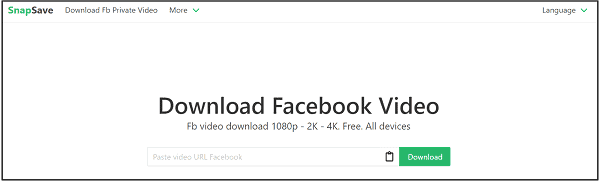
SnapSave is a popular Facebook private video downloader on the web. It is free and allows you to download videos in high clarity—up to 4k resolution.
All you have to do is grab the link of a private Facebook video. Open the downloader and paste your link. It will convert into ‘view source’ format. Copy the link and paste it into a new browser tab. Press Ctrl + A together on your keyboard to copy the entire page source code.
Go back to the video downloader page and paste your page source code there. Click on Download. Finally, you will see a screen like this.
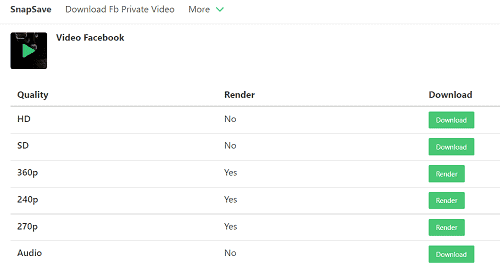
It will show various download formats based on the selected video quality. Click on Render to download and view your video.
2. SaveFrom.Net
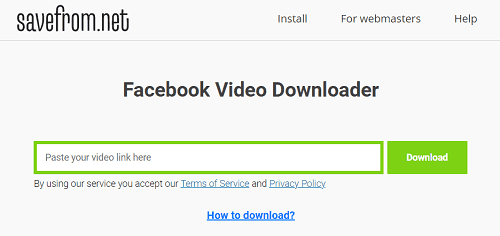
SaveFrom.Net is another place to download Facebook private videos. It is simple and easy to use. Open the video downloader and paste the video URL in the search box.
Wait a moment.
It will fetch and show your target video in no time.
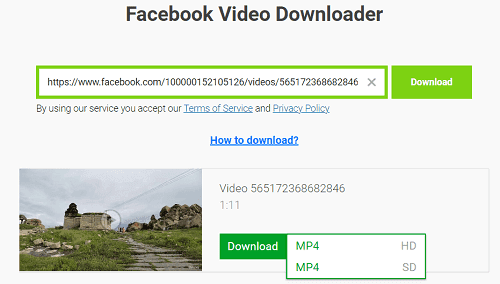
Click the drop-down arrow that appears next to the download button to see all available formats. Pick a video type to download.
3. VidSaver

VidSaver is a free Facebook private video downloader. Enter your private video URL in the search box and hit Go.
Next, it will generate the source code of your file. Paste it in a new tab. Collect the entire page source code from there.
Go back to VidSaver and click Next. Paste the page source code that you copied in the previous step and tap on Next, once again. VidSaver will retrieve your video and display all downloadable formats in the last step.
Choose a format and download.
Done.
4. Pastedownload
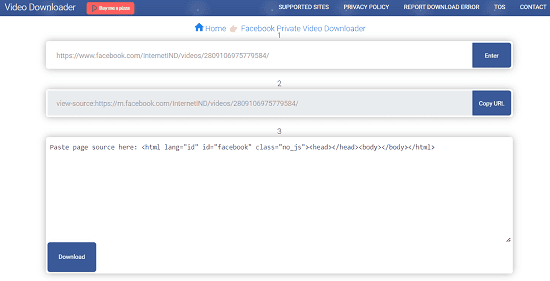
Pastedownload is a free private video downloader for Facebook. It works across desktop and mobile devices. The download quality ranges from 144p to 1080p full HD, in MP4, MKV, and other formats.
Grab your private video URL first. Enter it in the downloader’s search box and hit Enter. The software will generate its view source link automatically. Paste it in a new tab and copy the entire code you saw. Go back to the Paste Download screen, paste the page source code.
Right-click on the download button and select the ‘Save link as’ option to download the video. In smartphones, hold the Download button to get the download link.
5. Story Saver
Story Saver is a Google Chrome extension to download videos, stories, and photos from Facebook and Instagram. Install it from the Chrome Web Store. Then, open a Facebook or Instagram video that you want to download.
This tool will generate download links in multiple formats. Click a link to download the video to your computer.
6. FB AIO
FB AIO is a multipurpose Chrome extension for Facebook. It lets you view Facebook locked profiles, search others’ posts, and find what groups they are joined.
You can also download photos, videos, stories, and reels from my account. View anyone’s Facebook stories anonymously and download them in bulk. FB AIO can do many more things, like bulk unfollow users, unlike, and leave multiple groups in 1 click.
This tool supports Instagram, Threads, and TikTok as well.
7. Facebook Video Downloader
Facebook Video Downloader lets you download Facebook videos for free. It is simple and supports downloading all public videos on the social site.
Open a video and copy its URL. Go back to the Small SEO Tools page and paste your video URL. Hit enter and wait.
Facebook Video Downloader will connect to Facebook servers and retrieve the video. Finally, it will show download links in HD and SD qualities.
Click on Download.
That’s it.
Best Practices for Safe Downloads
Downloading from random sites can be risky. Hackers use fake tools to spread malware. Keep yourself safe by following these points:
- Stick with trusted downloaders.
- Avoid clicking suspicious ads on downloader sites.
- Keep antivirus active when using online tools.
- Download only your own videos or with permission.
How to Download Facebook Videos Manually
Follow these steps to download any Facebook video without using any third-party tool,
- Open the private video on Facebook.
- Right-click anywhere and select “View Page Source.”
- Press Ctrl + F (or Command + F on Mac).
- Search for keywords like hd_src or sd_src.
- Copy the full video link next to them.
- Paste that link into a new tab.
- Right-click the video and select “Save Video As.”
You can also use built-in screen recorders on Windows, Mac, Android, or iOS to download videos from Facebook. Play the video and record it in real-time. This works even if no tool can download it.
Read How to Create a Facebook Private Account