If you run a Facebook Page, you already know one thing. A post can be great, but if nobody sees it, nothing happens.
That is where page likes help you. When more people like your Facebook Page, your posts will reach more news feeds. Facebook encourages page owners to grow followers, build engagement, and treat likes as a signal for relevance.
Page likes do a few helpful things at once:
- They act as social proof. A page with real followers looks more trusted.
- They give your posts a bigger starting audience.
- They help the algorithm learn who cares about your content.
You do not need a huge budget to get organic page likes. Facebook gives you a built-in invite feature to invite friends, contacts, and people who have already reacted to your posts to like your page. Facebook’s help centre lists this invite option for both desktop and mobile, which shows it remains a core growth tool.
In this guide, I will tell you how to invite people to like a Facebook Page step by step. You will see how to use the invite button, how to invite people who liked your posts, and how to ask for likes without sounding pushy.
You will also learn simple methods to grow Facebook Page likes organically. We should focus on real people, real interests, and long-term engagement. No fake likes that hurt your reach later.
Let us get started.
Contents
How to Invite People to Like a Facebook Page on Desktop
Step 1: Log in to Facebook with your personal account. Click ‘See more’ on the left sidebar to view your own pages.
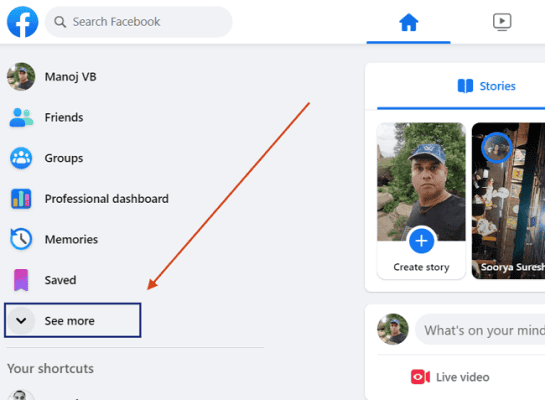
It will show more options. Scroll down to the bottom and go to the Visit Pages menu.
Step 2: You should see all your business pages now.
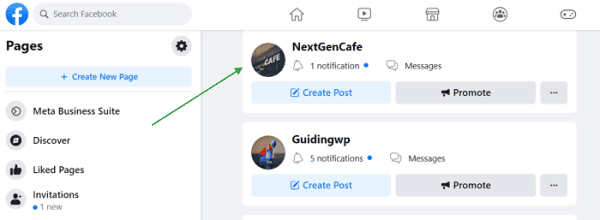
Open a Facebook page to send invitations.
Step 3: Tap the three-dots icon on the right side.
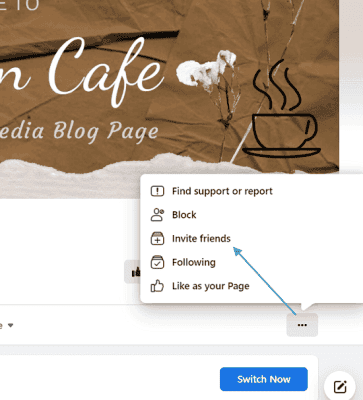
Click ‘Invite friends’ from the pop-up menu.
Step 4: A pop-up will list your Facebook friends. If needed, click “Switch” to make sure you are inviting as your personal profile (not accidentally as the Page).
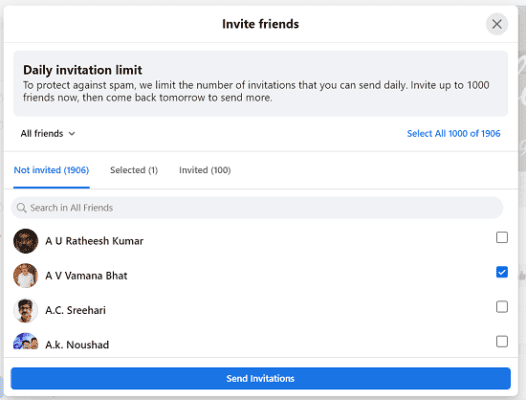
Go through the list and check the boxes beside the friends you’d like to invite. Facebook allows you to send up to 1000 invitations per day.
Click “Send Invites”. Those friends will receive a notification or invite to like your Page.
That’s it.
How to Invite People to Like a Facebook Page on Smartphones or Tablets
Step 1: Open the Facebook app on your mobile.
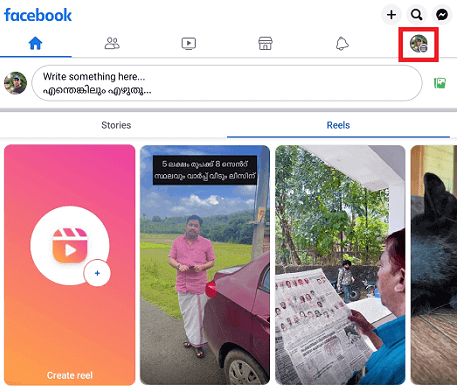
Tap your profile picture icon from the top-right corner.
Step 2: Head to All Shortcuts> Pages.
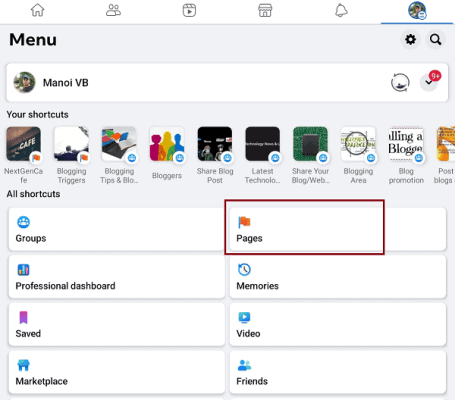
The next page will show all the Facebook pages you manage. Open a page to send invitations.
Step 3: Tap the three-dots icon from the right side.
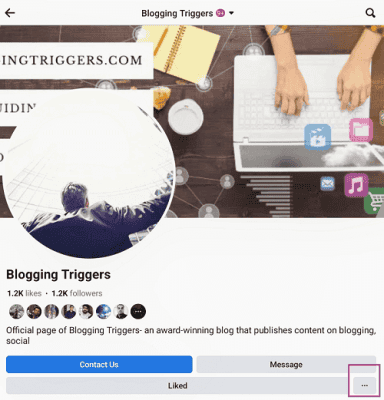
Choose Invite friends. If prompted, “Switch” your profile so the invite goes from your personal account (not the Page).
Step 4: Select people from your friend list. As I said earlier, you can send up to 1000 invitations daily.
Select all (1000) or select them individually. Finally, tap the Send Invitations button to send.
Bonus: Invite People Who Already Liked or Engaged with Your Posts
A smart way to grow your Page audience is by inviting those who already showed interest — e.g. by liking or reacting to a post. These people have seen your content and might like your Page too.
Here’s how:
- Go to a post on your Page that has reactions (likes, loves, etc.).
- Click on the number of likes or reactions. That should open a list of the users who reacted.
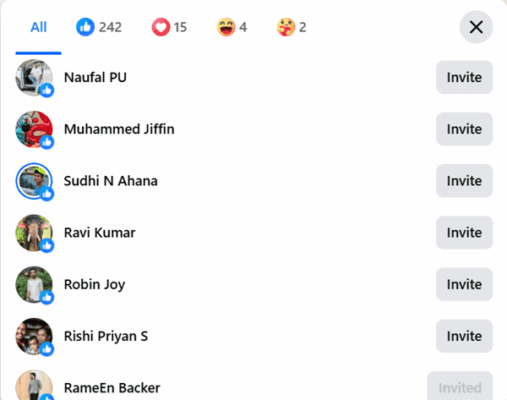
- In that list, look for an “Invite” button beside users who haven’t liked your Page yet. Click “Invite”.
- Optionally, add multiple page editors — each editor can send invites (within limits) to expand reach faster.
This method often yields higher conversion — because the users already interacted with your content. They’re likely to be genuinely interested.
Final thoughts
A growing Facebook Page doesn’t happen by accident. It starts with inviting people, and then giving them reasons to stay there. When you share useful posts, and when you respond to followers, people pay attention.
Invitations help you reach contacts who already know you. Quality content turns them into active followers.
Send a round of invitations on the first day, post something helpful, and respond to anyone who engages. Add your Page link wherever people interact with your brand. As more visitors respond and share, you will get more likes.
Real growth comes from genuine interactions. Focus on people, not just numbers. Keep posting, keep inviting, and keep talking to your audience. The results will grow steadily and last longer.
Read How to Remove Followers on Twitter